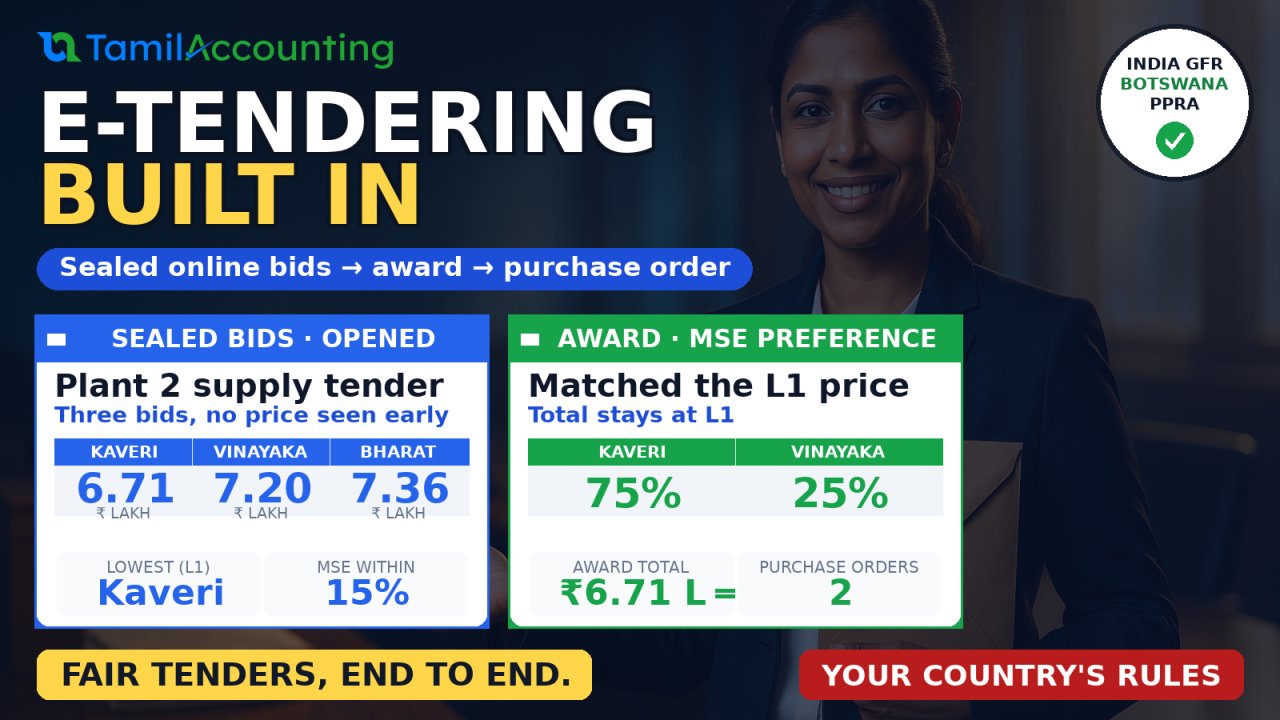
Buying through a tender is meant to be fair: every supplier sees the same invitation, every bid stays sealed until a public opening, and the lowest compliant offer wins under rules everyone knows in advance. Run on e-mail and spreadsheets, it rarely feels that way. Bids arrive in inboxes days early, prices leak, nobody can prove who opened what, and the award still has to be typed into the purchase system by hand. eProcure brings the whole tender into TamilAccounting, from the public notice to the purchase order.
What eProcure does
eProcure is a buyer-side e-tendering app. You publish a tender, suppliers register and bid online, the bids stay encrypted until the opening time, a committee evaluates them under your country's procurement rules, and the approved award becomes an ordinary purchase order in TamilAccounting.
- Tender methods: Open Domestic Bidding, Open International Bidding, Restricted Bidding (invited bidders only), Reserved for Micro and Small Enterprises, and Request for Quotations.
- Evaluation: Lowest evaluated price (one envelope), Two stages (a technical cut-off, then prices), or Quality and cost (a weighted technical and price score).
- Award: the whole tender to one bidder, or line by line to the lowest offer for each line.
- How bidders take part: the public notice board and their personal link, the supplier portal, or a sealed envelope in the tender box.
- Country rules: India (GFR 2017, the MSE purchase policy and Make in India), Botswana (Public Procurement Act and PPRA rules), or general rules, chosen from the company's country.
The problem with tenders by e-mail
- Bids are not sealed. A price that arrives by e-mail can be read the moment it lands, and nobody can show it wasn't.
- The opening has no record. Who was present, which bids arrived on time and what each one said is scattered across inboxes.
- Preferences are worked out by hand. Purchase preference for micro and small enterprises, local-content rules and fee exemptions are easy to get wrong and hard to defend.
- The award is retyped. The winning prices go into a purchase order by hand, and the link between the tender and the order is lost.
How it works
1. Prepare and publish the tender
From eProcurement → New → Tender, give the tender a title and scope, choose the Procurement Method, the Evaluation and the Award rule, then the dates: Questions Until, Closing and Opening. Add the Tender Fee, the bid security (an EMD amount or a Bid Security Declaration), the Registration Categories a bidder must hold, and the lines: each item or service with its quantity. Save it as a draft, then Publish: it appears on your public notice board.
All deadlines run on the company's own time zone. Each user can choose their own zone in My Profile and sees "your time" next to each deadline; bidders see the buyer's time and their own local time.
2. Bidders register, get the documents and bid
A supplier registers once on the notice board and receives a personal link by e-mail. From it they request the tender documents. If a fee applies they pay it and upload the proof of payment, or pay at your counter; you confirm it and the documents are issued. Under the India rules, micro and small enterprises and startups pay no tender fee and get the documents at once.
The bid holds a price for each line, the bid security details (or the declaration), the local content of the offer and any documents. When the bidder presses Submit the Sealed Bid, the bid is encrypted on the server and the bidder gets a receipt with its seal. Nobody, the buyer included, can read a price before the opening. A bidder can replace or withdraw the bid until the closing time; at the closing time the tender closes by itself.
3. Open the bids in public
Once the opening time has passed, Open Bids decrypts every bid that arrived on time and records who was present. Late bids stay sealed. A bid whose seal does not check out is marked non-responsive. Two-stage tenders open the technical envelopes first; the prices of bidders who pass the technical cut-off are opened only after the committee's result is approved.
4. Evaluate, recommend and approve
Evaluate converts every price to the tender's currency, applies the preference rules of your country and ranks the bids. The committee then Recommends the award, with a justification if it is not the lowest bid, and a different officer Approves it. Every bidder is notified: a letter of award to the winners and the outcome to the others. Complaints can be lodged during the standstill period and hold the contract until they are decided.
5. Raise the purchase order
On the Award tab, a winning bidder who is not yet a supplier becomes one with Link or Create the Supplier. Raise the Purchase Order then opens the normal purchase order screen already filled in: the supplier, the awarded lines and prices, and the tender reference. When every winner has its order, the tender is marked Contracted. The printable Evaluation Report puts the opening register, the evaluation, the award and the approvals on one page.
Country rules
| India (GFR 2017, MSE policy, Make in India) | Botswana (PPRA rules) | |
|---|---|---|
| Fee | Tender Fee; micro and small enterprises and startups exempt | Document Fee; discount for youth-owned companies |
| Bid security | EMD amount, or a Bid Security Declaration; MSEs and startups always give the declaration | Bid Security amount |
| Bidder details | MSE (Udyam number), SC/ST, women-owned, startup, local supplier class and local content | Citizen ownership class, youth, women, people with disabilities |
| Price evaluation | Purchase preference: an MSE within L1 + 15% may match L1 for 25% of the quantity; a Class-I local supplier within L1 + 20% (when L1 is not Class-I) may match L1 for 50% | Preference margins taken off the evaluated price for citizen ownership and target groups |
| Eligibility | A tender reserved for MSEs accepts only MSEs; domestic tenders exclude non-local suppliers | Foreign companies are refused on national tenders |
The rules are picked from the company's country (or its currency), and can be changed in Settings → General → Procurement Rules. Each country has a preset button that sets the fees, bid security and preference schemes in one step.
Botswana in simple words
Each bidder states how much of the company is owned by citizens. Citizen-owned companies get a price preference: a margin you set is taken off their price before the bids are ranked. Companies owned by young people, women or people with disabilities can earn an extra margin, and youth-owned companies pay less for the tender documents. A tender can be reserved for wholly citizen-owned companies, a national tender is closed to companies based outside Botswana, and a foreign company that sub-contracts work to citizen-owned companies earns a preference too.
Other countries
India and Botswana are the first two rule sets. eProcure can be extended to other countries' procurement norms and policies, so the fees, the bid security, the preferences and the rules on who may bid follow your own country. Talk to us about yours.
How to turn it on
- Open Apps and activate eProcure.
- In eProcurement → Settings → General, check the Procurement Rules, set the Tender Reference Prefix, the Tender Fee Income Account, the bank account fees are usually received into and the Procurement Officer, and apply your country's preset.
- Add your Registration Categories and check the Preference Schemes.
- Give your team the eProcurement permissions in their roles. Keep opening, evaluation and approval with different people.
Worked example: an MSE purchase preference
TamilAccounting Demo, India, tenders for inverter batteries, cables and transformers for Plant 2: Open Domestic Bidding, lowest evaluated price, the whole tender to one bidder, a tender fee of ₹1,000 and an EMD of ₹10,000. Three bids arrive before the closing time.
| Line | Quantity | Kaveri Electricals | Sri Vinayaka Power Systems | Bharat Energy Storage |
|---|---|---|---|---|
| Battery | 40 each | 9,500 | 10,200 | 10,400 |
| Cables and Wires | 500 metres | 85 | 92 | 95 |
| Transformers | 4 sets | 62,000 | 66,500 | 68,000 |
| Total | 6,70,500 | 7,20,000 | 7,35,500 | |
| Above L1 | L1 | 7.38% | 9.69% | |
| Standing | Class-II local supplier | Micro or small enterprise, Class-I local supplier | Class-I local supplier | |
| Fee and security | Paid ₹1,000; EMD by bank guarantee | Exempt; Bid Security Declaration | Paid ₹1,000; EMD by bank guarantee |
Kaveri Electricals is L1. Sri Vinayaka is a micro or small enterprise within 15% of L1, so the evaluation offers the MSE purchase preference: Sri Vinayaka may supply 25% of the quantity if it matches the L1 price. Bharat Energy is a Class-I local supplier within 20% of a Class-II L1, so the Make in India preference (50%) is offered too. The committee recommends the MSE preference and records Sri Vinayaka's written acceptance in the note. After approval the award reads:
| Line | Kaveri Electricals (75%) | Sri Vinayaka Power Systems (25%, matched L1) |
|---|---|---|
| Battery at 9,500 | 30 = 2,85,000 | 10 = 95,000 |
| Cables and Wires at 85 | 375 = 31,875 | 125 = 10,625 |
| Transformers at 62,000 | 3 = 1,86,000 | 1 = 62,000 |
| Total | 5,02,875 | 1,67,625 |
The two awards add up to exactly 6,70,500, the L1 price: the buyer pays nothing extra for the preference. Each winner then gets its own purchase order with these lines and prices.
Frequently asked questions
Can anyone at the buyer read a bid before the opening?
No. Each bid is encrypted the moment it arrives, with a key kept outside the database. The bid list shows only that a bid arrived and its seal, never a price, until the opening time has passed and the bids are opened.
What if a bidder brings a paper bid?
Use the tender box. The envelope is logged on arrival without its contents, and keyed in only after the public opening, so nobody types a price before the opening.
Can a bidder change the bid?
Yes, until the closing time a bidder can replace or withdraw the bid from their personal link. After the closing, the bid is fixed.
Do bidders need a TamilAccounting login?
No. They register on the public notice board and use their personal link. Suppliers who already use your supplier portal can take part from there.
Which time do the deadlines use?
The company's own time zone. Staff see each deadline in company time and in their own time zone, and bidders see the buyer's time and their own local time.
Our country is neither India nor Botswana. Can we use it?
Yes. The general rules work anywhere: tender fees, bid security, sealed bids, opening, evaluation and award. And eProcure can be extended to your country's own procurement norms and policies.
Can we award line by line?
Yes. Choose "Line by line to the lowest offer" when you create the tender. Each line goes to its lowest evaluated offer and each winning bidder gets its own purchase order.
In a hurry? Watch the 50-second version: eProcure in a minute.