Financial statements
Trial balance, P&L against budget, balance sheet and the period statement.
Every invoice, bill, payment, payslip and journal in TamilAccounting already sits in one ledger. The trial balance, profit and loss, balance sheet and cash flow are that ledger, read the moment you open them — compared with last year or the budget, filtered by branch, and open down to the document behind every figure.
The additions of 2026 answer where the cash went, how the month compares with the plan, and who should see it.
Start at net profit and walk through working capital, investing and financing to the change in cash — or read the same period as plain receipts and payments, beside the previous period.
Watch the walkthroughA month-end pack of profit, cash, tax, aged receivables and payables and bank balances. Choose the recipients and sections, preview it, and save the setup for next month.
Watch the walkthroughCompare every income and expense account with the year to date, the same period last year, or the budget you set, with the percentage achieved.
Watch the walkthroughA printed report with the variance and the achieved percentage for every budgeted account, and a month-by-month section when you want to see where the year drifted.
Learn moreOpen an account’s ledger and each foreign-currency line shows its currency, its rate and the amount in that currency beside the home amount.
Learn moreThe Overview shows revenue, expenses and net profit against last year, the balance sheet in three numbers, and four ratios that say whether the numbers are healthy.
Watch the walkthroughAccounts grouped under a parent read as one line in the trial balance, balance sheet and profit & loss, with a + to open the family and its subtotal.
Learn moreSchedule any report to your inbox daily, weekly or monthly; each run moves its dates forward on its own.
Watch the walkthroughIn most offices the statements are compiled, not read: exported from three places and stitched together in a spreadsheet. By the time they are ready, the month they describe is long gone.
The owner asks how the month is going and the answer is “after we close the books”. Decisions about stock, hiring or pricing are made on last month’s feeling.
Cost: a week or more between what happened and knowing about it.
Sales from one report, expenses from another, the bank from a third. One wrong paste and the profit figure that goes to the bank is not the profit in the books.
Cost: hours of copying, and figures nobody can trace back.
The profit and loss says the business made money, yet the bank account is short. Without a cash flow statement nobody can say whether it is stuck with customers, in stock or in a new machine.
Cost: surprise overdrafts and difficult calls to suppliers.
The budget is made in January in a spreadsheet and never compared with what really happened. Overspending on rent or travel is found at the year-end audit.
Cost: overruns discovered when it is too late to act.
The auditor asks what makes up the 1,50,000 in repairs. Someone spends the afternoon filtering exports to find the bills behind one number.
Cost: audit questions answered slowly, and sometimes not at all.
Each branch manager gets the company total, not their own numbers, so no one owns their branch’s profit — and head office cannot see which branch carries the others.
Cost: weak branches hidden inside a healthy total.
Nothing here is compiled. Each step reads the same ledger, so every statement agrees with every other one.
Open Financial Statements, pick a period, and the answers are already there. Click any group or account to see what makes it up.
The Overview opens on the questions an owner asks first, for the financial year so far — each figure beside the same point last year.
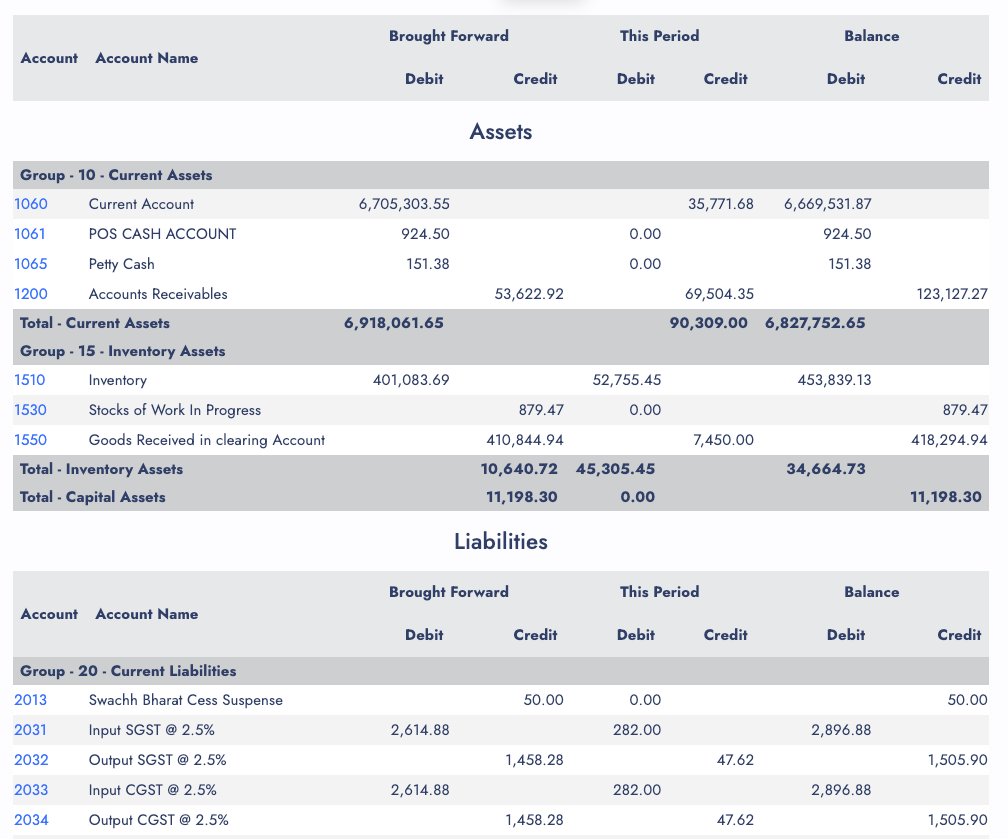
Every account with its debits and credits in three pairs of columns — brought forward, this period and the closing balance — under its group and class, with group totals and a grand total. Because every transaction posts as a complete double entry, the two sides always agree.
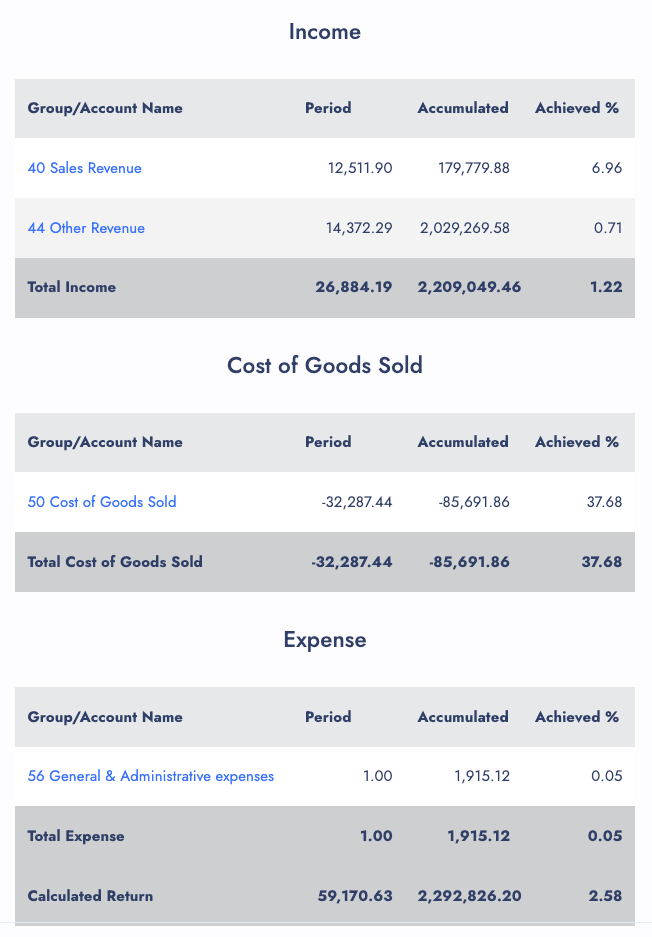
A profit figure means little on its own, so the Profit and Loss drill-down always puts it beside a comparison you choose, with the percentage achieved on every account, group and class — and the net profit at the end.
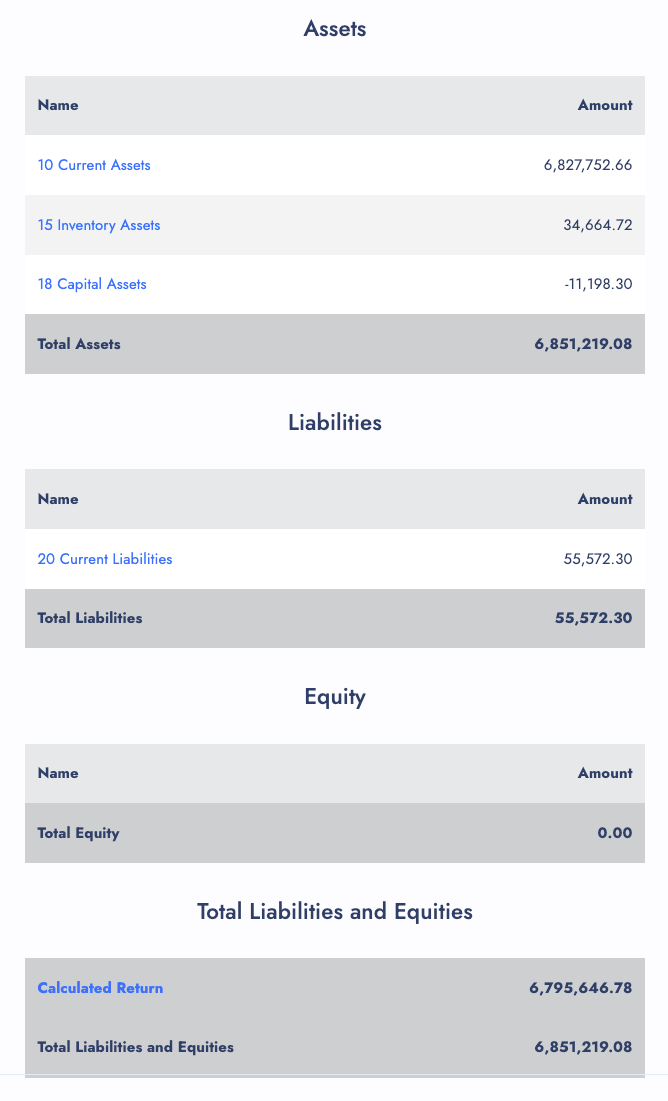
Assets, liabilities and equity group by group. Click a group and its accounts open in a window, parent families included; click an account and its ledger opens.
A business can post a healthy profit and still be short at the bank. The Statement of Cash Flows reconciles the two and ends at a balance anyone can check: the movement in your bank and cash accounts.
Built for the people outside the business — the owner, the accountant, the bank. Pick a period and it lays out the whole month, each figure against the previous period.
A sale on credit is revenue today and money next month; a new machine is cash today and cost spread over years. Here one quarter’s profit of 3,67,870 is walked to the bank balance — and the last line is the figure your bank statement shows.
Switch to the receipts and payments view and the same quarter reads the plain way, money in and money out, for anyone who would rather see the bank book than a reconciliation.
Indirect view — illustrative figures
| Net profit for the period | 3,67,870.00 |
| Add back depreciation (no cash moved) | 84,000.00 |
| Increase in receivables | (2,15,400.00) |
| Increase in payables | 62,300.00 |
| Cash from operating activities | 2,98,770.00 |
| Purchase of equipment | (1,50,000.00) |
| Loan repaid | (60,000.00) |
| Net movement in cash | 88,770.00 |
| Opening cash and bank | 4,11,230.00 |
| Closing cash and bank | 5,00,000.00 |
Nobody types this statement. Each line is read from the ledger using the cash flow section of the account’s group, so the screen and the printed report always agree.
Recorded on a demo company: the overview, a month-end pack sent by email, the trial balance, profit and loss against budget, the balance sheet — and the report for every other question.
Trial balance, P&L against budget, balance sheet and the period statement.
Who owes you, what sold, what is in stock — the report for each question.
Under Reports, the same statements print as PDFs or export to Excel with more options.
Every statement as a PDF to print, or as a spreadsheet with numbers kept as numbers, in portrait or landscape.
Simple, summary, detailed and standard — from a one-page check to every account in full.
Run the balance sheet and profit and loss for one branch, one department or one account tag.
Add bars, lines, a pie or a donut to the printed balance sheet and profit and loss.
The Annual Expense Breakdown shows every expense month by month; the Expense Breakdown covers any period.
Group, account, ledger line, then the invoice, bill or journal that made the entry.
Pick a report, its options, who receives it and how often; Run Now sends one straight away.
See which user created which transaction, and when, for the numbers behind the numbers.
The statements are only as good as the entries behind them. In TamilAccounting those entries come from the documents themselves, so nobody posts a summary by hand.
Switching software is the hard part. We help you move, keep your records sound, and keep improving the system with you.
Move across from Tally, Zoho, QuickBooks, Xero, Sage 50 or SMACC, or from Excel templates for items, customers, suppliers, employees, chart of accounts and opening balances. You preview every row before it is saved — and our team helps you through it.
Your database is backed up three times a day — every 8 hours — and your files are backed up too. Each company keeps its own separate database; roles decide who can see, enter, approve or void; every change is on the audit trail; and everything exports to Excel or PDF whenever you want it.
We follow up regularly with the businesses that use it, and their requests become features. Updates arrive on your account automatically — nothing to download or reinstall.
GST e-invoice and e-way bill, ZATCA, WooCommerce, WhatsApp, biometric devices, online payment gateways, mobile apps and an AI assistant — and new connections are added as the market moves.
No. Every invoice, bill, payment, payslip and journal already sits in one ledger, so the statements are that ledger read the moment you open them. Closing a period only stops anyone changing it afterwards.
Every account group carries a cash flow section — operating, investing, financing, a non-cash adjustment, or cash itself — chosen once where the groups are defined. Groups you never touch take a sensible section from their class, so the statement is right from the first day.
Yes. The Profit and Loss drill-down compares each account with the year to date, the same period last year or the budget, and the printed Profit and Loss Statement and Budget vs Actual report do the same in PDF or Excel.
Yes. The Period Statement can be printed, exported to Excel or emailed from the system. Choose the recipients, the sections and a covering note, and save the choices so next month’s pack goes out in two clicks.
Yes. The trial balance filters by branch and department, and the printed balance sheet and profit and loss can be run by branch, department and account tag.
Until the financial year is closed, the balance sheet shows this year’s profit separately as the calculated return. Closing the year moves it into retained earnings with a closing entry, so the new year starts with a clean profit and loss.
Yes. File related accounts under a parent account and the trial balance, balance sheet and profit and loss show one rolled-up line per family, with a + to open it and a subtotal underneath. Totals never change — grouping only changes how the rows read.
Yes. Choose any report with its options, the recipients, and daily, weekly or monthly, and it is emailed on schedule. Each run moves its dates forward on its own.
Try TamilAccounting with your own accounts — the trial balance, profit and loss and cash flow are ready the moment you post.
Supports GST (India), VAT (UAE, South Africa, Egypt, Iraq, Botswana), and local compliance across all regions.