Sales types & taxes
Tax-inclusive and tax-exclusive prices, tax groups and how the same item stays correct.
Set your taxes up once and every quotation, order, invoice and bill in TamilAccounting is taxed the same way, whoever types it — whether the price includes tax or not. Each tax keeps its own accounts, every period shows what is due, and the returns, e-invoices and e-way bills come from the documents you already raised.
The additions of 2026 move e-invoicing into the invoice screen, protect your input credit and keep every price list taxed the same way.
The IRN, acknowledgement and signed QR come straight back onto the invoice you raised — one at a time or a month’s worth in one pass, with the portal’s reason shown on any rejection.
Learn moreRaise the e-way bill from the registered invoice with the vehicle, transporter and distance. Every goods line goes with its own GST, and the register shows which bills expire in the next 24 hours.
Watch the walkthroughUpload the 2B file and see what matches, what is in 2B but not in your books, and what you booked that is missing from 2B. Validate a supplier’s IRN the day the bill arrives.
Learn moreOnce an invoice carries a live IRN, Edit and Void disappear everywhere in the system until it is cancelled at the portal.
Watch the walkthroughStandard invoices are cleared, simplified ones reported, and the hash chain moves on only when an invoice is accepted. Onboarding runs as a guided wizard inside the system.
Learn moreA price list with tax inside and one with tax on top post the same taxable value and the same tax, and the price column says which one you are looking at.
Watch the walkthroughSet Tax Enabled to No and the tax menu, tax lines and tax fields disappear. Once you file a tax period, the switch locks so a filed period never loses its tax.
Watch the walkthroughSwitch TDS/TCS on in Company Setup, choose the section on a sales or supplier invoice, and record the TDS deducted when a customer pays you or you pay a supplier.
Indian companies see each item’s HSN code on the Sales & Project Invoices Summary and the Purchase Order Summary, which now splits taxable value and tax per line.
Tax worked out on a calculator, a return built in a spreadsheet the night before it is due, and portals that know nothing about your books. It holds together until the first notice arrives.
The counter quotes a price with tax in it; the trade desk quotes before tax. Someone adds tax to an inclusive price, and the customer is overcharged — or your sales figure quietly includes tax.
Cost: wrong invoices and a sales figure you cannot trust.
Intra-state or inter-state, exempt or differently rated — the clerk picks the tax by memory. One wrong choice on a large invoice and the return no longer matches what the buyer claimed.
Cost: mismatches with your buyers’ returns and notices to answer.
Output tax from one report, input tax from another, adjusted in a spreadsheet the night before the due date. Nobody can say afterwards how the filed number was reached.
Cost: late nights each month, and figures that cannot be traced.
An invoice is back-dated into a month whose return has already gone in. Now the books and the return disagree, and nobody noticed when it happened.
Cost: revised returns, interest and awkward questions at audit.
A supplier’s bill is booked and its tax claimed, but the supplier never reported it. You find out when the credit is reversed — with interest.
Cost: credit lost that you had already paid for.
GST in India, VAT with e-invoicing in Saudi Arabia, VAT returns in the Gulf and Africa. Running each country on a different package means a different set of books to reconcile.
Cost: duplicated work and group figures that never agree.
Each step uses what the one before it recorded, so the tax on the invoice is the tax in the ledger is the tax in the return.
The same tax engine runs through sales, purchases and Point of Sale, and the country rules load only for companies in that country.
A sales type is a price list — Retail, Wholesale, Dealer, Export — and each one says whether its prices already contain tax. The customer’s price list comes with them onto every quotation, order and invoice, and the price column reads Price After Tax or Price Before Tax so nobody has to guess.
On each line, TamilAccounting takes the taxes in the customer’s or supplier’s tax group and removes any the item is exempt from. Nobody picks a tax by memory.
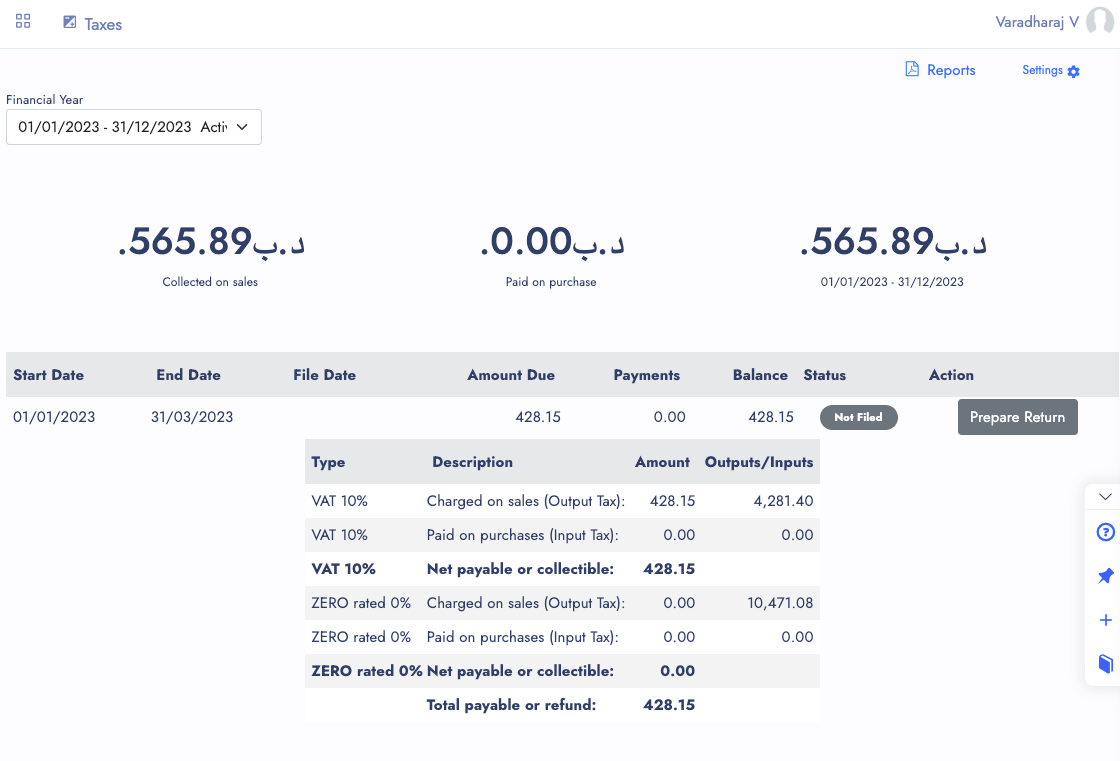
Set your filing period once in Company Setup — monthly, every two months, quarterly, half-yearly, annually and more. The Taxes home shows tax collected on sales and paid on purchases for the year, then every period with the amount due, payments and balance.
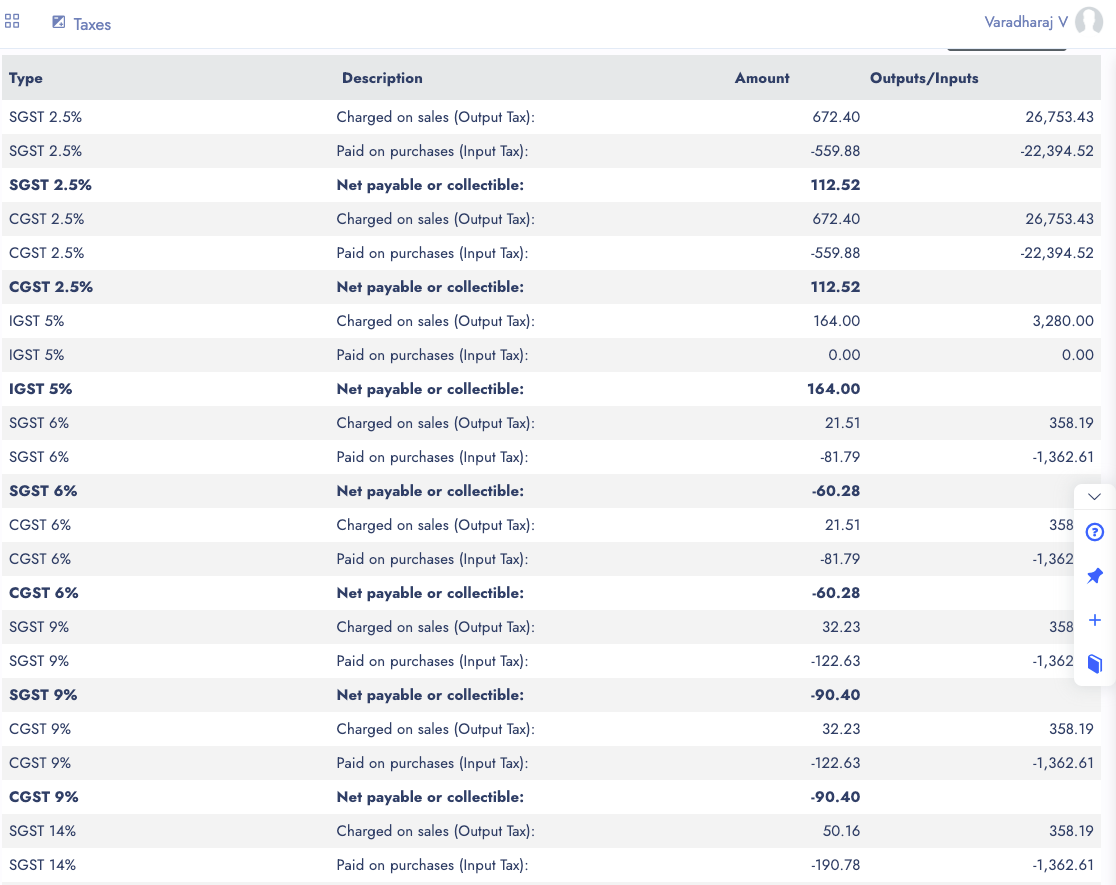
Every company gets the Tax Report, detailed or summary, for any period — each tax charged on sales, paid on purchases and the net payable or refundable. Country packs add the reports their return asks for.
Generate the IRN from the invoice you raised — or let every invoice register itself on save. The IRN, acknowledgement and signed QR come back onto the invoice and print on your layout, and the e-way bill is raised from the same document.
For Saudi companies, issuing the invoice is the exchange with ZATCA: the system builds the e-invoice, signs it, links it to the invoice before it, then clears or reports it and prints the QR.
A tax-included sale of 1,180 within the state, and a supplier bill of 600 plus tax. Each tax lands in its own account — collected on one side, paid on the other — so the period’s net is simply the difference.
Here the period owes 180 collected less 108 paid: 72 to pay, shown on the Taxes home against that period until it is filed and paid.
Illustrative figures — nobody types these entries; the invoice and the bill post them
| Sales invoice (Retail, tax included) | Debit | Credit |
|---|---|---|
| Customer account | 1,180.00 | |
| Sales | 1,000.00 | |
| CGST collected 9% | 90.00 | |
| SGST collected 9% | 90.00 | |
| Supplier bill (price before tax) | ||
| Purchases | 600.00 | |
| CGST paid 9% | 54.00 | |
| SGST paid 9% | 54.00 | |
| Supplier account | 708.00 | |
| Totals | 1,888.00 | 1,888.00 |
Under VAT the same sale posts one VAT line of 180.00 instead of the CGST and SGST pair. Either way, the sales account carries the taxable value only.
Recorded on demo companies: tax-inclusive and exclusive prices, a GST e-invoice and e-way bill raised without opening the portal, and a Saudi invoice cleared under Phase 2.
Tax-inclusive and tax-exclusive prices, tax groups and how the same item stays correct.
IRN, signed QR and e-way bills generated from the invoice — no portal to open.
Clearance, reporting and the hash chain handled for every invoice.
Small things that stop the big mistakes, all part of the core.
Monthly, every two months, quarterly, half-yearly or annually — chosen once in Company Setup.
Tax payable is recorded as a bank payment; tax refundable as a bank deposit, both from the period.
Tick the taxes that also apply to shipping in a tax group, and freight is taxed with the goods.
An order, invoice, bill, payment or journal dated in a filed period warns before it is saved.
Group companies in India, Saudi Arabia, the UAE, Bahrain and South Africa each follow their own rules.
Every tax report and filing prints as a PDF or exports to Excel with numbers kept as numbers.
The Period Statement carries taxable sales, output tax, taxable purchases and input tax credit.
e-Invoicing is switched on per company and can be tried against a test environment first.
Sales, purchases, Point of Sale and job work all use the same tax setup, so the return reflects the whole business.
Switching software is the hard part. We help you move, keep your records sound, and keep improving the system with you.
Move across from Tally, Zoho, QuickBooks, Xero, Sage 50 or SMACC, or from Excel templates for items, customers, suppliers, employees, chart of accounts and opening balances. You preview every row before it is saved — and our team helps you through it.
Your database is backed up three times a day — every 8 hours — and your files are backed up too. Each company keeps its own separate database; roles decide who can see, enter, approve or void; every change is on the audit trail; and everything exports to Excel or PDF whenever you want it.
We follow up regularly with the businesses that use it, and their requests become features. Updates arrive on your account automatically — nothing to download or reinstall.
GST e-invoice and e-way bill, ZATCA, WooCommerce, WhatsApp, biometric devices, online payment gateways, mobile apps and an AI assistant — and new connections are added as the market moves.
No. Generate the e-invoice from the invoice you already raised; the IRN, acknowledgement and signed QR come back onto it, and the QR prints on the invoice automatically. E-invoicing is switched on per company, and you can test against the sandbox before going live.
No. A registered invoice cannot be edited or voided anywhere in the system. Cancel it at the portal first, and it unlocks.
Every company gets the Tax Report, detailed or summary, for any period. Indian GST companies also get GSTR-1, GSTR-2A, GSTR-3B and the ITC-04 job-work report, and the Taxes home page shows every tax period with the amount due, payments and balance.
No. Each price list says whether its prices include tax. An inclusive price of 1,180 and an exclusive price of 1,000 at 18% both post a taxable value of 1,000 and tax of 180, and the sales account never includes tax.
Yes. Set up your TDS and TCS sections under Taxes, choose the section on the invoice, and record the TDS deducted when you receive a customer payment or pay a supplier.
No. The Saudi rules load only for Saudi companies and the Indian GST rules only for Indian ones, so each company follows its own country’s requirements.
Yes. Set Tax Enabled to No in Company Setup and the tax menu, tax lines and tax fields disappear; documents already posted keep their entries. Once you start filing tax periods, the switch is locked so a filed period can never lose its tax.
Any entry dated inside a filed period raises a warning before it is saved, and once the period’s tax is paid the books are closed up to the end of that period, so nothing can be added to it afterwards.
Set up your taxes once — every invoice, bill and return in TamilAccounting follows them, in India, the Gulf and beyond.
Supports GST (India), VAT (UAE, South Africa, Egypt, Iraq, Botswana), and local compliance across all regions.