General ledger: journals, budgets, period close
Journals, budget vs actual, parent accounts and closing a period.
Sales, purchases, banking, payroll and manufacturing post their own journals. Around them TamilAccounting gives the accountant a chart of accounts that stays readable, journals that must balance, budgets measured against the books, and a close that keeps a signed-off year exactly as it was.
Added through 2026: planning against the books, a growing chart of accounts kept readable, foreign-currency lines shown as they were booked, and a wrong delete undone.
Set each account’s budget month by month for the company, a branch or a department. Spread an annual figure evenly or copy last year’s actuals, and note the purpose of every budget.
Watch the walkthroughBudget beside actual with the variance and achieved percentage, grouped by class and account group — green when it is good news, red when it is not — and any account month by month.
Watch the walkthroughThe printed twin of Budget Inquiry, by account group, branch and department, with an optional month-by-month section; PDF or Excel.
Watch the walkthroughFile related accounts under a parent. The trial balance, balance sheet and profit & loss show one line per family with a + to open it, and every total stays exactly the same.
Watch the walkthroughA journal deleted as Restorable reopens in a ready-filled entry screen, so you choose the date before it posts again — useful when the original month is closed.
Watch the walkthroughA restorable deleted entry can now also be given up for good, turning it into an ordinary void — with the same delete rights a void needs.
GL Inquiry, GL Account Inquiry and Journal Inquiry show each line’s currency, rate and amount in that currency, and so do GL Account Transactions and Statement of Accounts.
Indirect and receipts-and-payments views from the same ledger, with a cash-flow section on each account group; PDF or Excel.
Learn moreThis month’s journals and movements, active accounts, today’s postings, anything voided and the date the books were last closed.
Watch the walkthroughThe ledger is only as good as the habits around it. These are the problems accountants bring to us most often.
Every new bank account, suspense account or expense split adds a line. Before long the statements are complete but nobody can read them.
Cost: owners stop reading the reports they pay for.
The budget lives in a file, the actuals in the books. Comparing them means exporting, pasting and hoping the account codes still line up.
Cost: overspending noticed at year end, not in month two.
A back-dated sale or a late bill lands in a year the auditor has already signed, and last year’s figures quietly move.
Cost: filed returns and audited accounts that no longer agree with the books.
A journal removed as a “duplicate” turns out to be real. Rebuilding it line by line, with the right accounts and dimensions, takes longer than the original.
Cost: hours of re-keying, and a fresh chance of error.
A dollar invoice and a euro payment both read in rupees on the ledger. Checking them against the party’s statement means finding the original document.
Cost: slow reviews of every foreign-currency account.
When a figure moves, the question is who entered, changed or closed it, and when. Without a trail, the answer is a guess.
Cost: weak controls, and harder audits every year.
Most postings arrive by themselves. The ledger is where they are organised, planned against, checked and locked.
Accounts sit inside groups and groups inside classes, so every account knows where it belongs on the balance sheet or the profit and loss. As the chart grows, related accounts file under a parent.
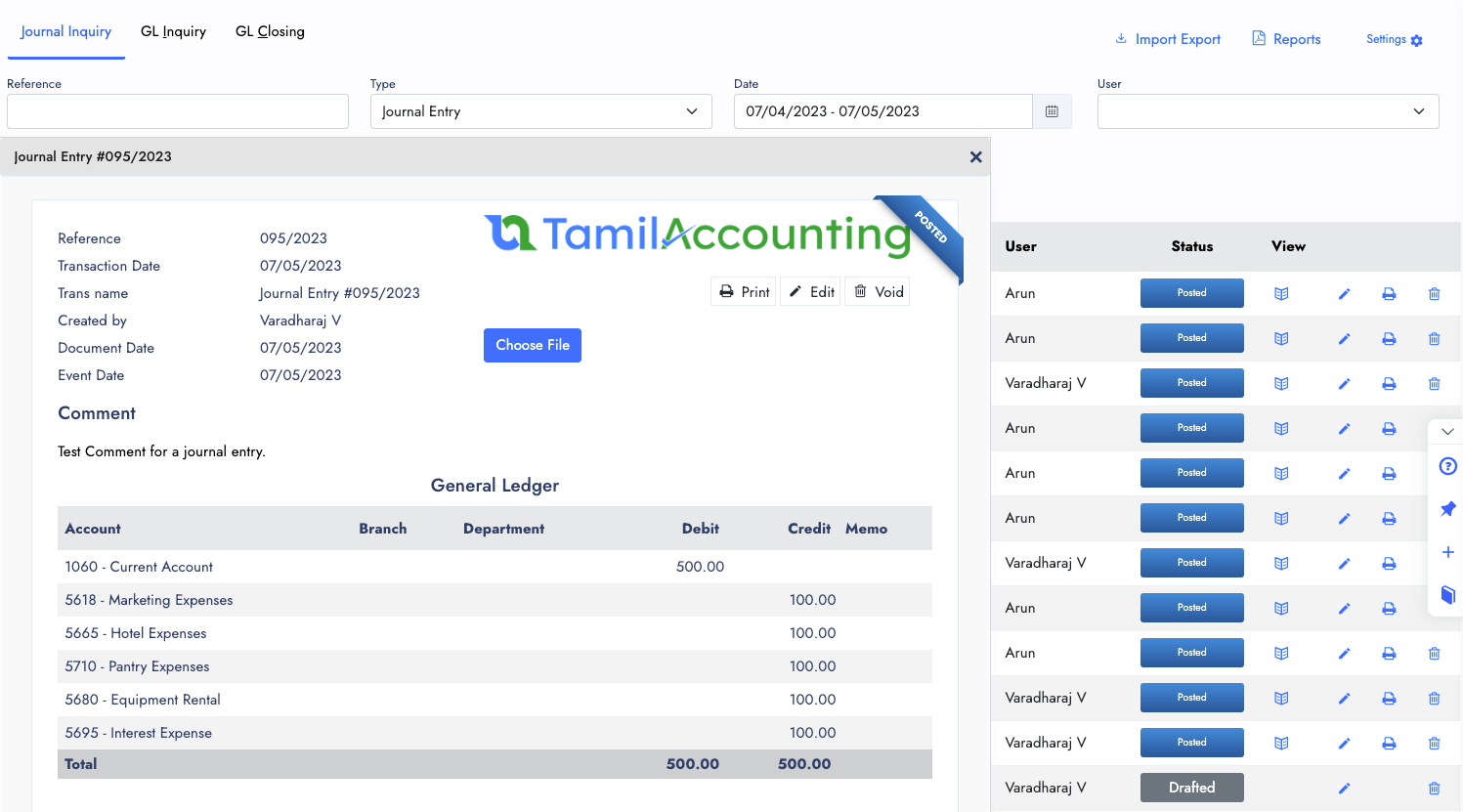
For everything that does not post by itself — accruals, provisions, reclassifications — there is Journal Entry: accounts, branch and department, a debit or credit on each line, and a memo.
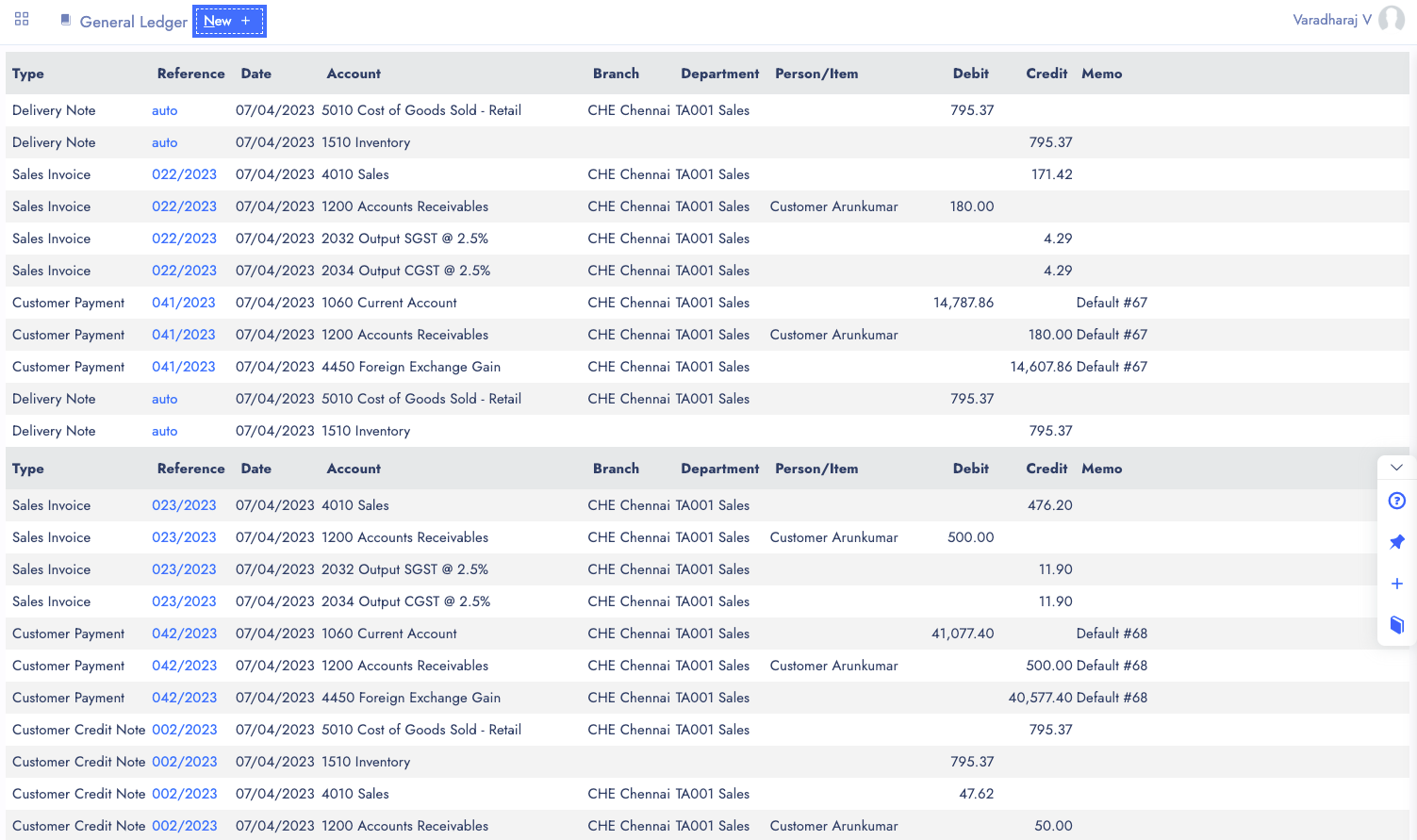
GL Inquiry opens any account over any period with its opening balance, a running balance after every line and the ending balance. Every line opens the document behind it.
Budget Entry sets an account’s budget for a financial year, month by month, for the whole company or one branch or department. Budget Inquiry then puts it beside what was actually posted.
GL Closing sets the date the books are closed up to. Nothing dated on or before it can be entered, edited or voided in any module: not a back-dated sale, not a late bill, not a journal.
The reports read straight from the same ledger the screens use, filtered by period, branch and department.
Invented figures on a demo company.
Audit fee for September, not yet billed
| Account | Debit | Credit |
|---|---|---|
| Accounting & legal | 25,000.00 | |
| Accrued expenses | 25,000.00 | |
| Totals | 25,000.00 | 25,000.00 |
The expense lands in the month it belongs to. The difference is zero, so the journal posts; one rupee out and it is refused.
Profit & loss, family opened with the +
| Account | Period |
|---|---|
| Interest & bank charges (own postings) | 1,20,000.00 |
| Bank service charges | 35,000.00 |
| Total Interest & bank charges | 1,55,000.00 |
Folded, the family is one line of 1,55,000.00. Group, class and grand totals are the same either way — the subtotal is a presentation line, never an extra amount.
Recorded on a demo company: parent accounts, a month-end accrual, budgets read against the books, the period close — and a deleted entry brought back.
Journals, budget vs actual, parent accounts and closing a period.
Voided and deleted transactions can be brought back, with the trail intact.
Trial balance, P&L against budget, balance sheet and the period statement.
Save rent, depreciation or any repeating posting once and pick it from the journal instead of typing it again.
Tag accounts across groups and classes, and run the profit and loss or balance sheet by tag.
Flags any transaction type that has no account to post to, before it becomes a gap in the books.
Every journal line can carry a branch and department, and inquiries, budgets and statements filter by them.
Bring your codes and structure across from a spreadsheet, including a parent code column for an already-grouped chart.
Save a half-finished journal and finish it later; nothing reaches the ledger until it is processed.
Date, time, user, type, reference and amount for each transaction, filtered by period, type and user.
Debit and credit activity for this month, last month, six months or a year, beside the accounts that moved most.
| Basic ledger + spreadsheets | TamilAccounting | |
|---|---|---|
| Growing chart of accounts | Every split adds a line to the statements | Parent accounts fold into one line with a + |
| Budgets | A separate file, compared by hand | By month, branch and department, read against actuals |
| Unbalanced journals | Found at trial balance time | Refused before they post |
| A signed-off year | Open to back-dated entries | Closed up to a date in every module |
| A wrong delete | Re-keyed from memory | Restored, ready-filled, with a new date |
| Foreign-currency lines | Home currency only | Own currency, rate and home amount together |
| Who changed what | Nobody is sure | Audit Trail by user, type and period |
Switching software is the hard part. We help you move, keep your records sound, and keep improving the system with you.
Move across from Tally, Zoho, QuickBooks, Xero, Sage 50 or SMACC, or from Excel templates for items, customers, suppliers, employees, chart of accounts and opening balances. You preview every row before it is saved — and our team helps you through it.
Your database is backed up three times a day — every 8 hours — and your files are backed up too. Each company keeps its own separate database; roles decide who can see, enter, approve or void; every change is on the audit trail; and everything exports to Excel or PDF whenever you want it.
We follow up regularly with the businesses that use it, and their requests become features. Updates arrive on your account automatically — nothing to download or reinstall.
GST e-invoice and e-way bill, ZATCA, WooCommerce, WhatsApp, biometric devices, online payment gateways, mobile apps and an AI assistant — and new connections are added as the market moves.
No. Grouping only changes how the rows read. Group, class and grand totals are worked out exactly as before; the family subtotal is an extra presentation line, never an extra amount.
Yes. A parent is an ordinary posting account. When its family is opened, its own balance shows on its own line, separate from the family total.
No — grouping is exactly one level, and parent and child must share the same account group. Deeper structure belongs to account groups and sub-groups, which the statements already nest. Set the parent back to None (Top Level) at any time to undo it.
Use GL Closing. Close the books up to a date, and nothing dated on or before it can be entered, edited or voided in any module — not a back-dated sale, a late bill or a journal.
Yes. A budget can be set for the whole company or for one branch or department, month by month, and Budget Inquiry and the Budget vs Actual report filter the same way.
If it was deleted as Restorable, yes. Restore it from the Voided / Deleted register under Setup; it reopens in a ready-filled journal so you can check the date and post it again. If you never want it back, Delete Permanently turns it into an ordinary void.
The ledger keeps every line in your home currency, and the inquiry screens and GL Account Transactions also show the line’s own currency, the rate and the amount in that currency, so a dollar invoice reads as dollars beside its rupee value.
Yes. The chart of accounts import brings your codes and structure across as they are, including a parent code column, so an already-grouped chart comes in in one step.
Start free, bring your chart of accounts across and see your budget beside your actuals.
Supports GST (India), VAT (UAE, South Africa, Egypt, Iraq, Botswana), and local compliance across all regions.