Point of sale
The ERP till, the POS app, mobile billing and the receipt designer.
Scan, search or tap items into the cart, take cash, card or a mix of both, and the receipt prints. Every sale is a real sales invoice: stock drops, payments land in the right cash and bank accounts, and the sale is in your reports the moment it is saved — on the web, in the POS app or on a phone.
Shipped this year: more ways to sell, safer prices and returns, and paperwork that looks like your shop.
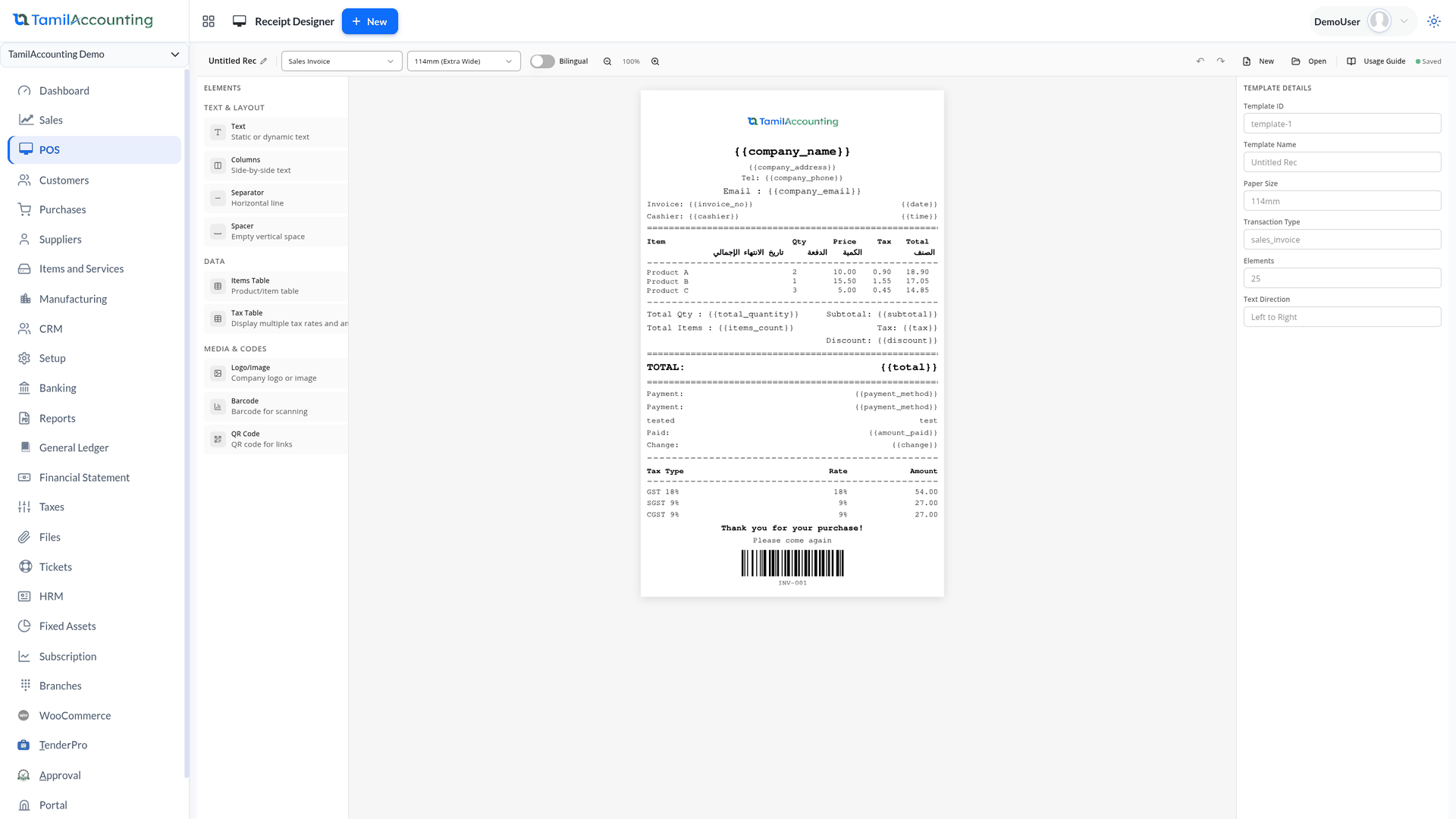
Drag text, the item table, a barcode, a QR code and your logo onto a 58–112 mm receipt, right in the ERP page — with right-to-left text and a unit column next to the quantity.
Watch the walkthroughShape the A4 invoice by dragging fields on the real PDF. A new design changes nothing you print until you press Make default.
Watch the walkthroughThe cashier records why the goods came back. It is saved on the credit note and printed on its view, its print and the POS receipt.
Learn moreChange from Retail to Wholesale mid-sale and every line is re-priced from the new list — tax-included prices are never taxed a second time.
Learn moreThe standalone POS app holds invoices on the device when the connection drops, then syncs them into the company when it returns.
Watch the walkthroughThe phone camera becomes the barcode and QR scanner, so a stall, a van or a second counter needs no scanning hardware.
Watch the walkthroughTake back the wrong size and the return value carries straight into the new sale — no cash needs to change hands.
Watch the walkthroughSave & Pay records a paid sales order, and its print and share buttons now open that order instead of an invoice.
Learn moreReward a return visit: a percentage or amount off, with a minimum purchase and expiry, redeemed against the customer’s earlier invoice.
Learn moreA stand-alone billing machine is fast at the counter and slow everywhere else. These are the gaps we see most.
The till keeps its own sales; the accounts are typed from its day-end printout. Any difference is found weeks later, if at all.
Cost: an accountant’s month spent matching numbers instead of reading them.
Counter sales reach the stock register at night, or never. The website, the second branch and the buyer all work from yesterday’s numbers.
Cost: selling what is not on the shelf and reordering what is.
Half the bill on cash, half on card, change given from memory. At closing, nobody can say which payment went where.
Cost: shortages written off with no trail back to the sale.
Refunds are given from the drawer without the original bill, so the same item can be returned twice and nobody knows why it came back.
Cost: refund leakage and the same product problem repeating.
A web-only till stops when the line does. Staff write bills on paper and type them in later — some twice, some never.
Cost: lost sales at the busiest hour and gaps in the books.
A cashier overrides a price, or the wrong price list is used for a trade customer, and the margin quietly disappears.
Cost: discounts nobody approved and nobody can see.
The counter is fast for the cashier, and every step is already posted for the accountant.
Three ways to run the till, one set of books behind all of them.
One setting in company preferences decides the till. Retail POS is built around the barcode: scan or search and the item lands in the cart with its price, tax and batch or expiry. The touch layouts show items as tiles or a list to tap, with categories across the top.

Every line can carry its own discount, and a discount or round-off can go on the whole bill. If a customer steps away, hold the bill: it waits as a tab across the top of the screen while the counter serves the next person.

The standalone POS app runs on its own web address for staff who never need the back office: the cart, held bills, reprints, and a tender screen where each cash and bank account is its own button. The mobile POS app on Google Play is the same counter shaped for a phone, with the camera as the barcode and QR scanner.

A return starts from the original invoice. Look it up, enter the quantity coming back — never more than was sold and not already credited — and why. A credit note is raised against the invoice with that reason on it.

The thermal receipt opens for printing the moment the sale is saved — or not, if you switch auto-print off. Its layout is yours: the Receipt Designer lets you drag text, columns, separators, the item table, a barcode, a QR code and your logo into place, with company details filled in for you.
Because every POS sale is a sales invoice, it is in every sales report and on the dashboard as soon as it is saved. The counter adds its own reports for closing time.

A customer buys three items for ₹1,500 plus ₹270 GST and pays ₹1,000 in cash and the rest by card. The cashier presses Pay & Complete once — and these entries are already posted.
There is no day-end upload and no suspense account: the cash account and the card’s bank account each show exactly what they took, ready for the bank reconciliation.
Worked example with round, invented numbers — nobody types these entries
| The sale | Debit | Credit |
|---|---|---|
| Customer account (cash customer) | 1,770.00 | |
| Sales | 1,500.00 | |
| GST output tax | 270.00 | |
| Stock leaving the counter (at cost) | ||
| Cost of goods sold | 900.00 | |
| Inventory — counter location | 900.00 | |
| The two payments, allocated to the invoice | ||
| Cash in hand | 1,000.00 | |
| Bank — card account | 770.00 | |
| Customer account (cash customer) | 1,770.00 | |
| Totals | 4,440.00 | 4,440.00 |
The invoice is fully allocated, so the customer owes nothing. On Pay Later, the payment lines are simply not there yet — the balance waits on the customer’s account like any other invoice.
So each till sells from the right stock into the right accounts.
Each point of sale sets whether cash or credit sales are allowed, its default cash account, the bank accounts offered and its stock location.
Link each salesman to a user login, so every sale and every collection is credited to the right person in the reports.
Each counter sells from its own location, so every branch or shop keeps its own stock while the books stay together.
One preference stops counter staff changing an item’s price, so only the price list decides it.
Batch-tracked items are sold with their batch and expiry, so the right stock leaves the shelf.
Sell on credit terms to known customers and take part payments; the balance sits on their account like any other invoice.
Print the receipt automatically after every sale, or switch auto-print off where not every customer wants one.
Files and supporting documents can be attached to a sale from its transaction view.
Recorded on a demo company: the till inside the ERP, the POS app, billing on a phone and the receipt designer — with every sale landing in the same books.
The ERP till, the POS app, mobile billing and the receipt designer.
Move the logo, restyle the title and add a note right on the real PDF — the new invoice designer.
Switching software is the hard part. We help you move, keep your records sound, and keep improving the system with you.
Move across from Tally, Zoho, QuickBooks, Xero, Sage 50 or SMACC, or from Excel templates for items, customers, suppliers, employees, chart of accounts and opening balances. You preview every row before it is saved — and our team helps you through it.
Your database is backed up three times a day — every 8 hours — and your files are backed up too. Each company keeps its own separate database; roles decide who can see, enter, approve or void; every change is on the audit trail; and everything exports to Excel or PDF whenever you want it.
We follow up regularly with the businesses that use it, and their requests become features. Updates arrive on your account automatically — nothing to download or reinstall.
GST e-invoice and e-way bill, ZATCA, WooCommerce, WhatsApp, biometric devices, online payment gateways, mobile apps and an AI assistant — and new connections are added as the market moves.
Yes. A POS sale is saved as a sales invoice: stock leaves the counter’s location as it would on a delivery, and each payment is recorded against its cash or bank account and allocated to the invoice. It shows up in sales reports and on the dashboard immediately.
Yes. Every cash and bank account allowed for the counter appears in the payment screen with its own amount, so one bill can be split across as many as you need. The change is worked out, and a card or bank charge can be added as a percentage.
The standalone POS app and the mobile POS app keep selling. Invoices are held on the device and synced into the company when the connection returns. The till inside the ERP needs a connection, like the rest of the ERP.
No. Retail POS has a barcode field for a scanner, the touch layouts let staff tap items, and the mobile POS app uses the phone’s camera to scan barcodes and QR codes.
Pick the original invoice, enter the quantity coming back and the reason, and choose whether the items return to stock or are written off. Refund in cash or to the bank, leave it as credit on the customer’s account, or carry the value straight into a new sale as an exchange. The reason is printed on the credit note and the receipt.
Yes. The Receipt Designer lays out thermal receipts by drag and drop for 58, 76, 80 or 112 mm paper, with your logo, a barcode or QR code and your company details. A4 invoices have their own drag-and-drop PDF Designer, and a new design only takes effect when you make it the default.
Yes. A company preference prevents price changes from the POS screen, so the item’s price list decides. Switching the price list itself re-prices every line in the cart.
Start free with your own items and counters — on the web, on a phone, or both.
Supports GST (India), VAT (UAE, South Africa, Egypt, Iraq, Botswana), and local compliance across all regions.