Every business that sells has a pipeline, whether or not it calls it one: the deals that are being talked about, the ones waiting on a price, the ones that are nearly there. The question is whether anyone can see it. When the pipeline lives in a list of opportunities with a status column, the answers to the questions that matter — how much is likely to close this month, which deals have gone quiet, why we keep losing to the same competitor — take an afternoon with a spreadsheet.
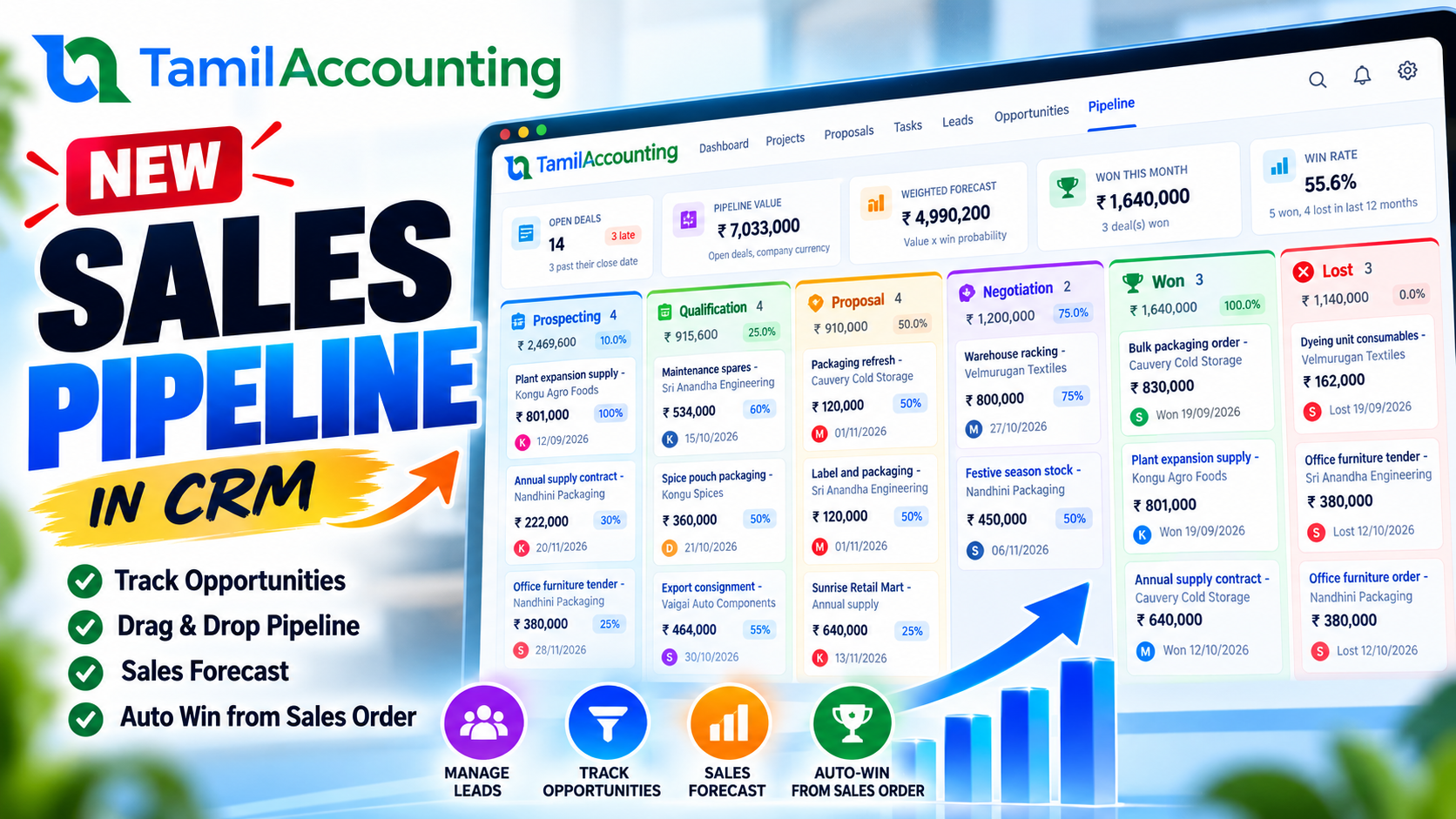
The CRM in TamilAccounting now has a sales pipeline. Every open deal sits in a sales stage, you move it with a drag, the forecast is worked out for you in your own currency, and when the customer's order is placed the deal marks itself as won.
What is new
- Sales stages — your own stages, in board order, each with a default win probability. Open stages, a Won stage and a Lost stage.
- The Pipeline board — a new Pipeline tab in CRM. Every open deal is a card in its stage's column; drag it to move it, or use the card's Move button on a phone.
- Won and lost, properly recorded — a won or lost deal carries the date it closed, and a lost deal carries the reason it was lost.
- Pipeline value and weighted forecast — counted in your company currency, on the board, the CRM overview and a new Sales Pipeline report.
- Quotation to order to won — raise a quotation straight from the deal; when the sales order made from that quotation is placed, the deal is marked won by itself.
- Stage History — every move of every deal: when, from which stage to which, who moved it and why.
The problem it solves
A status column tells you where a deal is. It does not tell you what the pipeline is worth. A deal at the first meeting and a deal waiting for a signature count the same in a plain total, so the total overstates what will really close. And when a deal is won, somebody has to remember to come back to the CRM and say so — usually after the order has been entered, the goods have shipped and the invoice has gone out. Until then the CRM is out of date, and the sales review is arguing about numbers instead of deals.
The pipeline fixes both. Each stage carries a win probability, so the forecast weighs a deal by how far along it is. And the deal is linked to the quotation and the order raised from it, so placing the order closes the deal without anyone having to remember.
How it works
Sales stages
Stages are set per company under CRM → Settings → Sales Stages. Every company starts with six:
| Order | Stage | Type | Default win probability |
|---|---|---|---|
| 1 | Prospecting | Open | 10% |
| 2 | Qualification | Open | 25% |
| 3 | Proposal | Open | 50% |
| 4 | Negotiation | Open | 75% |
| 5 | Won | Won | 100% |
| 6 | Lost | Lost | 0% |
Rename them, change their order and probability, or add stages of your own (a Demo or Site visit stage, for example). A few rules keep the board honest:
- A stage that deals are sitting in keeps its type and cannot be switched off.
- A stage that appears in any deal's history is switched off rather than deleted, so the history still reads correctly.
- There is always at least one active open stage, one won stage and one lost stage.
The board
The Pipeline tab shows one column per active stage. Each column's header gives the number of deals, their total value and their weighted value. Each card shows the deal, the customer, the value in the deal's own currency, the win probability, the expected close date (in red once it has passed) and how many days the deal has been in its stage — so the deals going quiet stand out.
Drag a card to another open stage and it moves: the probability changes to the new stage's default, the column totals update, and the move is written to the deal's Stage History. Every card also has a Move button, which opens a small form — choose the stage, adjust the probability if you know better, and add a note. That is how you move deals on a phone or with the keyboard.
Dropping a card on Won or Lost opens the same form, because closing a deal needs a little more: the date it was won or lost, and for a lost deal, the reason. A close date cannot be in the future.
The forecast
The pipeline value is the total of the open deals. The weighted forecast is each deal's value multiplied by its win probability, added up. Both are counted in your company currency at today's exchange rate, so a deal quoted in dollars adds up correctly with the rest. A currency with no rate on file is counted at face value, and the board says which currency it is.
Worked example: what the pipeline is really worth
Five open deals, amounts in the company currency:
| Deal | Stage | Value | Win probability | Weighted value |
|---|---|---|---|---|
| Annual supply contract | Qualification | 640,000.00 | 25% | 160,000.00 |
| Showroom fit-out | Prospecting | 300,000.00 | 10% | 30,000.00 |
| Festive season stock | Proposal | 450,000.00 | 50% | 225,000.00 |
| Warehouse racking | Negotiation | 800,000.00 | 75% | 600,000.00 |
| Packaging refresh | Proposal | 120,000.00 | 60% (typed by the salesperson) | 72,000.00 |
| Total | 2,310,000.00 | 1,087,000.00 |
The plain total says the team has 2.31 million in the pipeline. The weighted forecast says about 1.09 million is likely to close — and most of that is one deal in Negotiation. That is the conversation the sales review should be having.
A deal in another currency
| Deal value | Today's rate | In company currency | Stage | Weighted |
|---|---|---|---|---|
| 10,000.00 USD | 83.50 | 835,000.00 | Negotiation (75%) | 626,250.00 |
From quotation to order to won
Open an open deal and choose Create Quotation. The quotation opens for the deal's customer and carries a link back to the deal, shown in its header. Price it and place it as you would any quotation.
When the customer accepts, choose Sales Order on the quotation. The order inherits the link, and placing the order moves the deal to Won, dated that day, with a Stage History line naming the order. A few details:
- A draft order, or one still waiting for approval, does not win the deal. Releasing it later does.
- A deal that is already won or lost is left alone.
- A direct invoice made from the quotation counts too, through the sales order it creates.
- A deal with quotations or orders linked to it cannot be deleted, so the trail stays intact.
Worked example: the life of one deal
The Stage History of the annual supply contract, as the deal's record shows it:
| Date | From | To | By | Note |
|---|---|---|---|---|
| 02/10/2026 | — | Prospecting | Anitha | New opportunity, 640,000.00 |
| 06/10/2026 | Prospecting | Qualification | Anitha | First meeting went well |
| 09/10/2026 | Qualification | Proposal | Anitha | Quotation 014/2026 sent |
| 14/10/2026 | Proposal | Won | Ravi | Sales order 052/2026 placed |
Nobody marked this deal as won. Ravi in the sales office placed the order from the quotation, and the deal closed itself: the Won column gained 640,000.00, the open pipeline lost it, and the close date is the day the order was placed.
Step by step
- Check your stages. CRM → Settings → Sales Stages. Adjust the names and probabilities to the way you sell.
- Create a deal. CRM → Opportunities → New → New Opportunity. Choose the customer, the value, the expected close date and the starting Sales Stage; the probability fills itself in from the stage.
- Work the board. CRM → Pipeline. Drag cards as deals progress, or use Move. Filter by salesperson to run a one-to-one.
- Close deals honestly. Drop a lost deal on Lost and give the reason. Won deals close themselves when the order is placed — or move one to Won by hand when there is no order in the system.
- Review. The CRM overview shows the open pipeline, the weighted forecast and a Deals by Stage panel; Reports → CRM Reports → Sales Pipeline prints the open deals stage by stage with the forecast.
Frequently asked questions
What happens to the opportunities I already have?
When the update runs, each existing opportunity is placed in a stage from its status: Won goes to the Won stage, Lost to the Lost stage, Qualified to Qualification, and everything else to the first open stage. Each one gets a Stage History line saying it was placed by the update, and an open deal with no probability takes its stage's default.
Can I change the stages later?
Yes, at any time, under CRM → Settings → Sales Stages. Changing a stage's default probability does not rewrite the probability of deals already in it; a deal takes the new default the next time it moves.
Can a lost deal be reopened?
Yes. Open the deal, choose Move Stage and pick an open stage. The lost reason and close date are cleared, and the reopening is recorded in the Stage History.
Who sees which deals?
A user whose role can view all opportunities sees the whole board. Everyone else sees, and can move, only their own deals. A user tied to a branch or department sees that branch's deals unless their role allows other branches.
Does it work on a phone?
Yes. On a small screen the columns scroll sideways and every card has a Move button, so nothing depends on dragging.
Do support tickets from the customer portal show on the board?
No. Only sales opportunities are deals; tickets raised through the portal's helpdesk never appear in the pipeline, its totals or its reports.