Customer onboarding can make or break a software platform. The easier it is for users to get started, the more likely they are to complete registration and become active customers.
That's why we're excited to introduce Google Login and LinkedIn Login for your ERP platform.
With social sign-in enabled, users can create an account and start using your ERP within minutes—without creating another password or going through lengthy registration steps.
A Faster Way to Get Started
Traditional sign-up processes often require users to:
Fill out lengthy registration forms
Create and remember passwords
Verify their email addresses
Complete multiple onboarding steps before they can access the system
With Google and LinkedIn Sign-In, these barriers are significantly reduced.
Users simply choose their preferred sign-in provider, authenticate using their existing account, and continue directly to setting up their company information.
The result is a smoother onboarding experience and a higher likelihood of converting visitors into active customers.
Benefits for Resellers
As a reseller, you can offer a modern sign-in experience that matches what users expect from today's cloud applications.
Faster Customer Onboarding
Users can access the platform quickly without creating new credentials, reducing friction during registration.
Reduced Sign-Up Abandonment
Every additional step in a registration process increases the chance that a potential customer leaves before completing it. Social sign-in helps simplify the process and improve conversion rates.
Improved Security
Authentication is handled through trusted providers such as Google and LinkedIn, giving users a familiar and secure login experience.
Better User Experience
Returning users can sign in with a single click using the same provider they originally used, eliminating forgotten-password issues and reducing support requests.
How the Experience Works
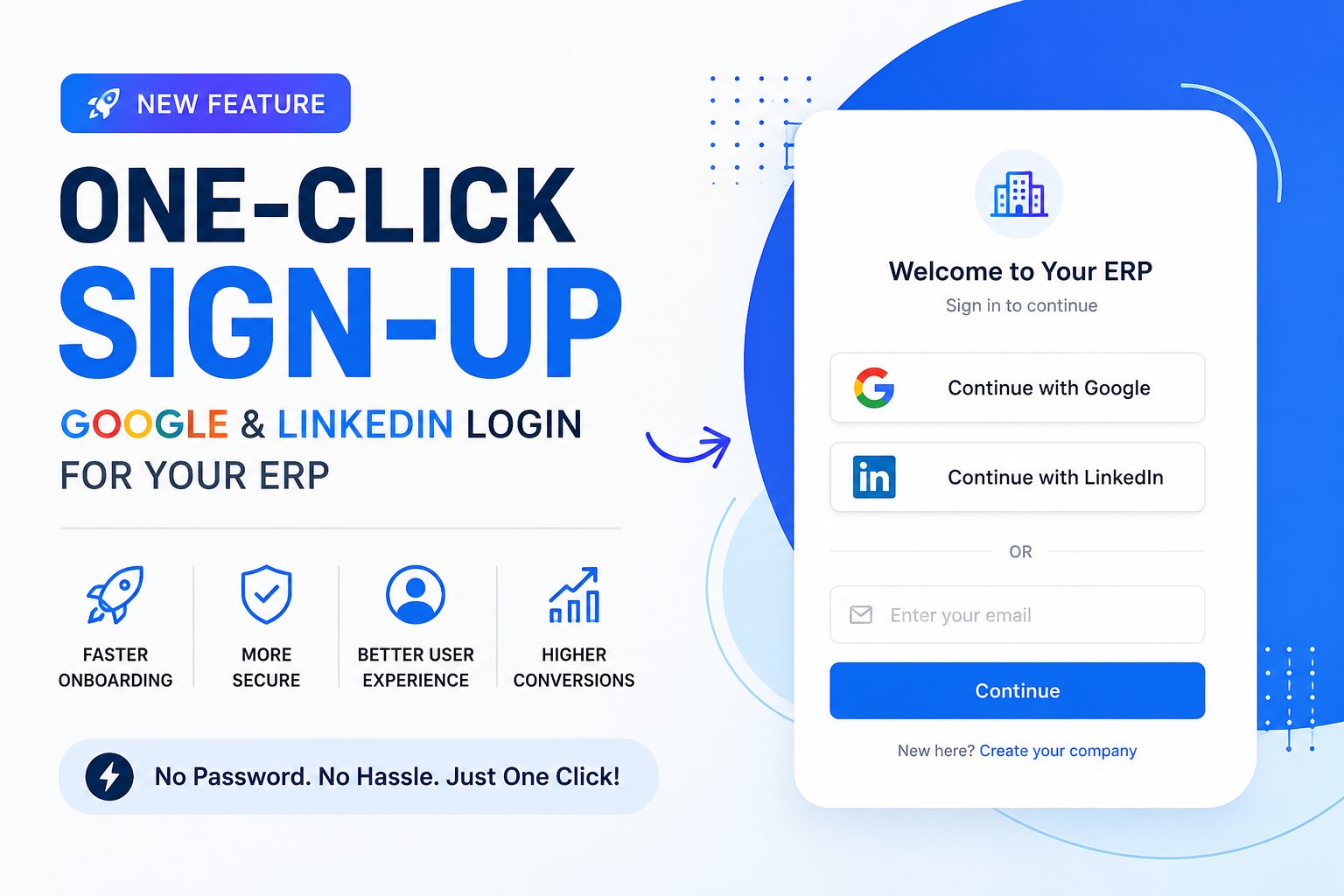
When users visit your ERP login or registration page, they can choose to continue using Google or LinkedIn.
For new users:
They authenticate with their selected provider.
They complete a short company setup form.
Their company account is created.
They are logged in and ready to start using the ERP.
For existing users:
They click their preferred sign-in provider.
Authentication is completed.
They are logged in immediately.
The entire process is designed to be simple, fast, and user-friendly.
Built for Multi-Reseller Environments
This feature has been designed specifically for multi-reseller ERP deployments.
Each reseller can configure their own Google and LinkedIn credentials, ensuring that authentication is handled under their own brand and business identity.
This approach provides:
Independent authentication settings for each reseller
Complete separation between reseller accounts
Branding consistency across customer-facing portals
Greater flexibility when managing multiple customer domains
Simple Configuration
Enabling social sign-in requires only a few steps:
Google Login
Create a Google application, obtain your credentials, and enter them into the ERP settings.
LinkedIn Login
Create a LinkedIn application, enable the Sign-In functionality, and enter the credentials into the ERP settings.
Activate the Feature
Once the credentials are saved, the corresponding sign-in buttons automatically become available to your users.
If you only configure one provider, only that provider will be displayed.
Why Modern Customers Expect Social Sign-In
Today's users are accustomed to signing in with services they already trust. Whether it's business software, e-commerce platforms, or productivity tools, social authentication has become a standard expectation.
By offering Google and LinkedIn Sign-In, you provide:
A modern user experience
Faster onboarding
Increased registration completion rates
Reduced password management issues
Enhanced convenience for returning customers
Start Offering One-Click Access Today
Google and LinkedIn Sign-In make it easier than ever for customers to start using your ERP platform.
With a streamlined onboarding experience, improved convenience, and reseller-specific configuration, you can deliver a professional login experience that helps users get started quickly and confidently.
Enable your preferred providers, save your settings, and give your customers the one-click access they already expect from modern cloud software.