Every receipt, every supplier payment and every transfer your business makes has to agree with the bank in the end. Banking in TamilAccounting is where that agreement happens: every account in one place, bank statements imported and posted by rules you write once, months reconciled to the rupee, foreign balances revalued, and every online gateway payment visible down to the fee.
Cash at a glance
The Banking overview opens on the question every owner asks first: how much cash do we have? Cash on hand across all accounts sits beside money in, money out and net cash flow for the month, with what is still unreconciled (and how old the oldest line is) and today's movement. A cash flow chart switches between this month, last month, six months and a year, and every active account has its own line with its balance, currency and unreconciled count.
Accounts, set up once
Each bank or cash account is tied to its own ledger account, so what Banking shows and what the balance sheet shows can never drift apart. An account records the bank, branch and account number, its type (current, savings, cash, credit, mobile or QR), its currency, and the account bank charges post to, with a default charge percentage for accounts such as a card machine.
Add a UPI ID to a rupee account and every invoice you print carries a UPI QR code for it, so a customer can pay the moment the invoice reaches them. Currencies keep their exchange rate history, a rate can be fetched with one click, and currencies can update automatically. Payment gateways (Razorpay, PayPal, Paymob and Telr) are switched on from the same settings.
Payments, deposits and transfers
Most bank entries arrive by themselves, from sales receipts, supplier payments and payroll. Anything that starts in Banking is entered as a payment, a deposit or a transfer. A payment can go to a supplier, a customer, an employee, a saved quick entry or a ledger account, and several people can be paid in one entry. The account's live balance shows while you type, lines can carry a branch, documents can be attached, and a half-finished entry can be saved as a draft.
A transfer moves money between your own accounts, and one transfer can feed several accounts at once, each line with its own amount, branch and bank charge. Bank Inquiry then shows each account as its own ledger, with totals across the top and a running balance after every entry.
Bank statements that post themselves
Typing a statement in line by line is where most of a bookkeeper's week goes. Instead, choose your bank's layout under Import Export, Bank Statements, and upload the file. The account is recognised from the bank name and account number on the statement, and created if it does not exist yet.
Before importing, write import rules. A rule looks for a word in the bank's narration, money in or out, and an optional amount range, and says what the line is: a receipt from a customer, a payment to a supplier, or a transfer to another of your accounts. A supplier payment is allocated to the open invoice with exactly that amount. Lines no rule catches are matched to customers and suppliers by name or bank account number, and to open invoices by the reference in the narration or the exact amount.
A worked example: a September statement
| Date | Bank narration | Amount | What happens |
|---|---|---|---|
| 02/09/2026 | NEFT CR CAUVERY COLD STORAGE LLP | 23,600.00 in | Rule: receipt from Cauvery Cold Storage LLP |
| 04/09/2026 | ATM WDL ANNA NAGAR CHENNAI | 20,000.00 out | Rule: transfer to Cash in Hand |
| 07/09/2026 | NEFT DR NILGIRI CHEMICALS AND ESSENCE | 14,160.00 out | Rule: payment to Nilgiri Chemicals & Essence |
| 09/09/2026 | UPI DR TNEB ELECTRICITY SEP 2026 | 9,120.00 out | Undefined: you choose Utilities |
| 11/09/2026 | INTEREST CREDIT SEP 2026 | 1,375.00 in | Undefined: you choose Interest income |
Three lines are posted the moment the file is imported. The last two wait in Imported Bank Inquiry as undefined: choose a ledger account for each (and the customer or supplier, for a receivable or payable account), tick them, and Add Bank Transactions posts and reconciles both together. A posted line can be rolled back if a rule got it wrong, and lines you never want to post can be cleared.
Reconcile to the rupee
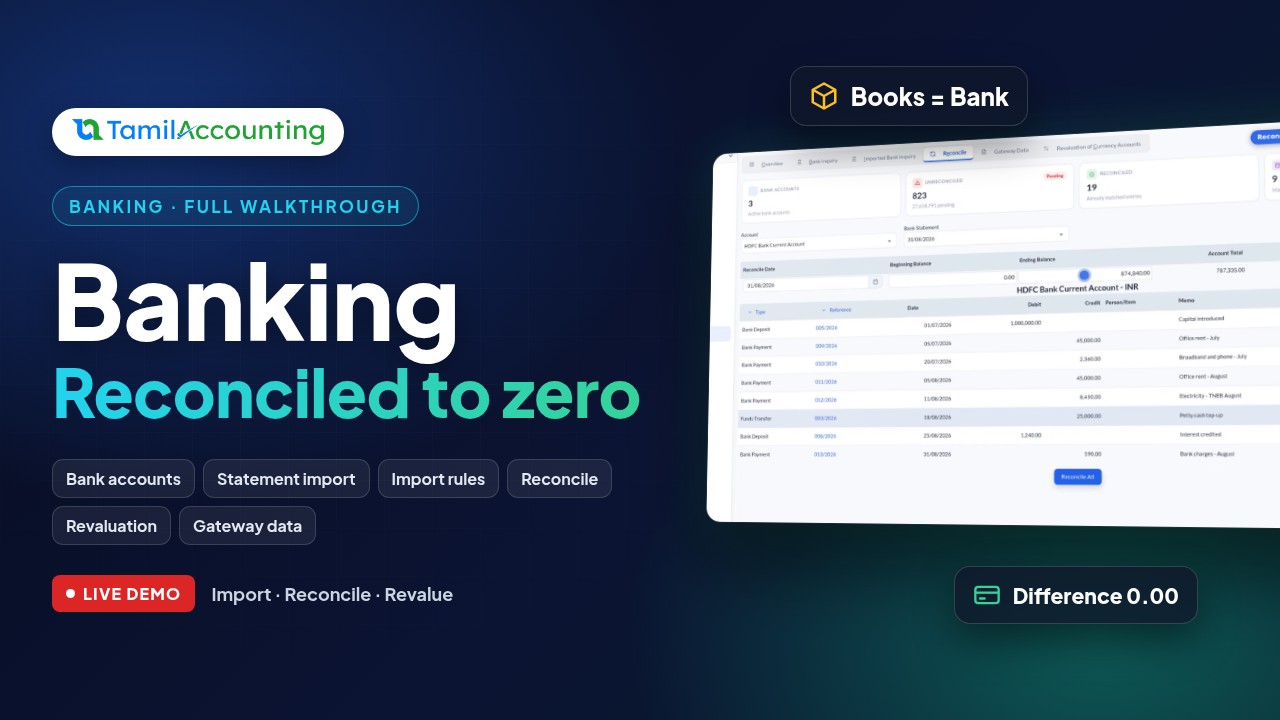
Reconcile lists every unreconciled line up to the statement date. Enter the statement's closing balance, tick each line as you find it on the statement, and the difference counts down. When it reaches zero, the books and the bank agree, and anything still unticked is genuinely in transit.
A worked example: August on the current account
| Date | Entry | Money in | Money out | Balance |
|---|---|---|---|---|
| 01/07/2026 | Capital introduced | 10,00,000.00 | 10,00,000.00 | |
| 05/07/2026 | Office rent, July | 45,000.00 | 9,55,000.00 | |
| 20/07/2026 | Broadband and phone, July | 2,360.00 | 9,52,640.00 | |
| 05/08/2026 | Office rent, August | 45,000.00 | 9,07,640.00 | |
| 11/08/2026 | Electricity, August | 8,450.00 | 8,99,190.00 | |
| 18/08/2026 | Transfer to cash in hand | 25,000.00 | 8,74,190.00 | |
| 25/08/2026 | Interest credited | 1,240.00 | 8,75,430.00 | |
| 31/08/2026 | Bank charges, August | 590.00 | 8,74,840.00 |
The bank statement for 31 August closes at ₹8,74,840.00. Tick all eight lines and the reconciled amount reaches ₹8,74,840.00, leaving a difference of zero.
Foreign balances, revalued
A dollar account is booked at the rate on the day of each transaction, and that rate moves. Say the account received USD 6,000 in August at ₹88.20, which is ₹5,29,200. At month end the rate is ₹88.95, so the same dollars are worth ₹5,33,700. Run Revaluation of Currency Accounts for that date and the ₹4,500 exchange gain is posted by itself, to the bank account and to every customer and supplier balance held in another currency.
Online payments, gross, fee and net
When a customer pays an invoice from its share link, or pays invoices and orders in the customer portal, the gateway's record arrives in Gateway Data. Every payment shows three figures together: what the customer paid, what the gateway kept, and what settles into your bank. A ₹11,800.00 payment with a 2% fee plus GST shows ₹278.48 kept and ₹11,521.52 settled, so a deposit that lands short is never a mystery. Record Payment turns any gateway payment into a customer payment against its invoice.
Banking reports
- Bank Payment, Bank Deposit and Bank Transfer: printable vouchers on your own template, filtered by party
- Bank Statement: every entry for one account or all of them over a period, with the running balance
- Monthly Balance Statement: cash movement month by month, by branch and department
- Bank Statement Reconcile: reconciliation dates and details for each account
- Statement of Accounts: the full cash flow with one customer, supplier or employee over a period
What Banking gives you
- Every bank and cash account tied to its own ledger account, in any currency
- A UPI QR code for your account on every rupee invoice
- Payments, deposits and multi-line transfers with bank charges, drafts and attachments
- Statement import with rules that post receipts, supplier payments and transfers for you
- Reconciliation with a difference that counts down to zero
- Currency revaluation that posts its own exchange gain or loss
- Gateway payments with gross, fee and net, from share links and the customer portal
- Seven banking reports, from vouchers to the reconciliation statement
Open Banking, and every rupee your business touches is already accounted for, and agreed with the bank.