Understanding the Sales Ledger: A Comprehensive Guide
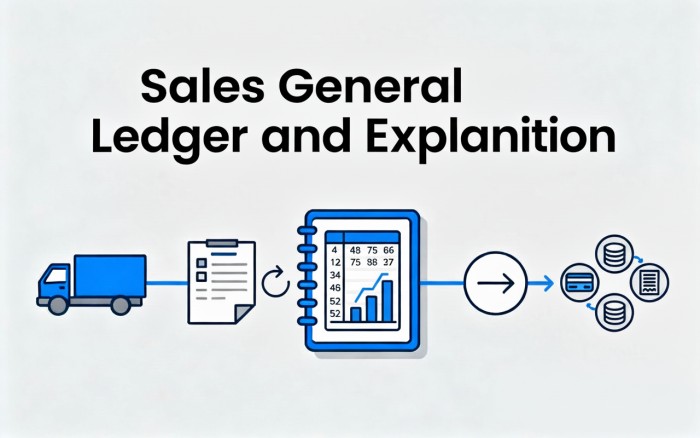
The sales ledger is a critical component of a company's accounting system, tracking all transactions related to the sale of goods or services from initiation to completion, including returns. It ensures accurate financial reporting by systematically recording debits and credits across various accounts. The sales ledger process typically involves four key stages: Delivery, Invoice, Payment, and Credit Note (Return). Each stage impacts different accounts, such as inventory, cost of goods sold (COGS), accounts receivable (AR), sales revenue, taxes, and cash/bank balances.
This article breaks down each stage with detailed explanations, real-world examples, and illustrative tables showing journal entries (the foundational postings to the general ledger). We'll use a consistent example scenario for clarity:
Example Scenario
- Product Sold: Widget (cost per unit: 60; selling price per unit: 100).
- Initial Sale: 10 units delivered and invoiced.
- Total Sales Value: 1,000.
- COGS: 600 (10 units × 60).
- Shipping Cost Charged to Customer: 50.
- Sales Tax (10% on sales): 100.
- Discount Given: 2% on sales (20).
- Net Invoice Amount: 1,130 (1,000 + 50 + 100 - 20).
- Payment: Full amount received via bank transfer.
- Return: 2 units returned (value: 200; COGS reversal: 120).
All entries follow double-entry bookkeeping principles: debits must equal credits. Tables below show the journal entries for each stage.
1. Delivery: Recording the Outflow of Goods
The delivery stage occurs when goods are physically shipped or transferred to the customer. This does not involve revenue recognition yet (under accrual accounting, revenue is recognized upon invoicing). Instead, it focuses on updating inventory and recognizing the cost of goods sold (COGS). The key entry is:
- Debit COGS: Recognizes the expense of goods leaving inventory also called as Cost of Goods Sold.
- Credit Inventory: Reduces the asset value of stock on hand.
This ensures the balance sheet (inventory) and income statement (COGS) are updated immediately, preventing overstatement of assets.
Example: Delivery of 10 Widgets
Upon delivery, the company incurs a COGS of 600. No cash or receivable is recorded here—it's purely an internal cost adjustment.
| Account | Debit | Credit |
|---|---|---|
| COGS | 600 | |
| Inventory | 600 |
Explanation:
- COGS Debit (600): This expense hits the income statement, reducing gross profit when sales are later recorded.
- Inventory Credit (600): Inventory asset decreases by the cost of goods delivered, reflecting the outflow.
- Impact: No effect on cash flow or receivables yet. This entry prepares the books for the upcoming sale by "committing" the cost.
In practice, if delivery notes are automated in ERP systems (e.g., QuickBooks or SAP), this entry triggers inventory alerts for restocking.
2. Invoice: Recognizing Revenue and Receivables
Once goods are delivered, an invoice is issued to bill the customer. This stage recognizes revenue and creates a receivable. Key accounts affected include:
- Debit Accounts Receivable (AR): The amount owed by the customer.
- Debit Discount Given: Any sales discounts offered (treated as an expense).
- Credit Sales Revenue: Core revenue from goods sold.
- Credit Shipping Cost: If charged to the customer (revenue).
- Credit Taxes Collected: Sales tax or VAT owed to the government (liability).
- Credit Round-Off: Minor adjustments for rounding in calculations (if applicable; often negligible).
Revenue is recognized here under accrual accounting (per GAAP/IFRS), even if payment is pending.
Example: Invoicing the 10 Widgets
The invoice totals 1,130 after discounts and add-ons. A 20 discount is applied as a sales incentive.
| Account | Debit | Credit |
|---|---|---|
| Accounts Receivable | 1,130 | |
| Discount Given | 20 | |
| Sales Revenue | 1,000 | |
| Shipping Cost | 50 | |
| Sales Tax Payable | 100 |
Explanation:
- AR Debit (1,130): Customer now owes this net amount; it increases assets on the balance sheet.
- Discount Given Debit (20): Reduces net sales on the income statement (shown as a contra-revenue account).
- Sales Revenue Credit (1,000): Gross revenue recognized, boosting the income statement.
- Shipping Cost Credit (50): Additional revenue if the company charges for delivery.
- Sales Tax Payable Credit (100): Liability for tax remitted to authorities later.
- Round-Off: Omitted here as it's 0; if needed (e.g., 0.50), credit a round-off account.
- Impact: Increases revenue and receivables. Total debits (1,150) equal credits (1,150) after discount. This entry links to the delivery by assuming the invoice references it.
Invoices should include details like terms (e.g., net 30 days) to enforce collections.
3. Payment: Recording Cash Inflow
When the customer pays (fully or partially), this stage clears the receivable and records cash inflow. It's straightforward:
- Debit Bank/Cash Account: Increases liquid assets.
- Credit Accounts Receivable: Reduces the outstanding balance owed.
This completes the revenue cycle for non-returned sales, converting receivables to cash.
Example: Full Payment for the Invoice
The customer pays 1,130 via bank transfer.
| Account | Debit | Credit |
|---|---|---|
| Bank Account | 1,100 | |
| Bank Charges | 30 | |
| Accounts Receivable | 1,130 |
Explanation:
- Bank Account Debit (1,130): Cash increases, improving liquidity on the balance sheet.
- Accounts Receivable Credit (1,130): Clears the receivable from the delivery/invoice stages, reducing assets but matching the prior debit.
- Impact: No effect on income statement (revenue was already recognized). If partial payment, only that portion of AR is credited. Bank fees (if any) would debit a separate expense account.
4. Credit Note (Return): Handling Returns and Reversals
Returns occur when goods are defective or unwanted, leading to a credit note (a negative invoice). This reverses the relevant portions of the delivery and invoice entries:
- Reverses Delivery: Debit Inventory (restore stock), Credit COGS (reduce expense).
- Reverses Invoice: Debit Sales Revenue (reduce revenue), Debit Shipping/Taxes (if applicable), Credit AR (reduce receivable), Credit Discount Given (reverse contra-revenue).
The credit note amount is deducted from the original invoice or issued separately, often with a new AR credit.
Example: Return of 2 Items
On return, 2 units (200 sales value) are returned. Shipping (10 prorated) and tax (20 prorated) are also reversed. Discount reversal: 4 (2% of 200). Net credit: 226 (200 + 10 + 20 - 4). Inventory and COGS are restored by 120.
| Account | Debit | Credit |
|---|---|---|
| Sales Revenue | 200 | |
| Shipping Cost | 10 | |
| Sales Tax Payable | 20 | |
| Inventory | 120 | |
| Accounts Receivable | 226 | |
| Discount Given | 4 | |
| COGS | 120 |
Explanation:
- Sales Revenue Debit (200): Reverses original credit, reducing net sales.
- Shipping Cost Debit (10): Reverses any charged shipping (prorated).
- Sales Tax Payable Debit (20): Reduces liability (refund tax if collected).
- Inventory Debit (120): Restores goods to stock (asset increases).
- Accounts Receivable Credit (226): Reduces what customer owes (net reversal).
- Discount Given Credit (4): Reverses the prior expense (increases net revenue slightly).
- COGS Credit (120): Reverses the cost expense, improving gross profit.
- Impact: Debits total 350; credits total 350. This "undoes" 20% of the original transaction. If the return exceeds the invoice, it may create a payable to the customer.
Credit notes should reference the original invoice for audit trails and trigger restocking in inventory systems.
Integrating the Full Sales Cycle
In our example, the net effect after all stages (full payment minus return) is:
- Revenue: 800 (1,000 - 200).
- COGS: 480 (600 - 120).
- AR: 0 (fully cleared).
- Bank: +904 (1,130 payment minus 226 credit note adjustment—assuming credit note applied to future invoices or refunded).
| Summary Account | Net Debit | Net Credit | Balance Impact |
|---|---|---|---|
| Inventory | 120 | 600 | -480 (asset ↓) |
| COGS | 600 | 120 | +480 (expense ↑) |
| AR | 1,130 | 1,356 | -226 (asset ↓) |
| Sales Revenue | 200 | 1,000 | -800 (revenue ↓) |
| Bank | 1,130 | 0 | +1,130 (asset ↑) |
| Discount Given | 20 | 4 | +16 (expense ↑) |
| Shipping Cost | 10 | 50 | -40 (revenue ↓) |
| Sales Tax Payable | 20 | 100 | -80 (liability ↓) |